
Palworld’s vast open world and resource-heavy base automation make running a smooth dedicated server a serious challenge. Between notorious Unreal Engine memory leaks, persistent AI pathfinding loops across automated bases, and continuous multi-player world syncing, offloading your server workload onto dedicated hardware is essential.
The market is flooded with game server hosts claiming “unlimited resources,” yet many budget hosts rely on overcrowded nodes equipped with weak, legacy server CPUs that buckle as soon as multiple bases start crafting.
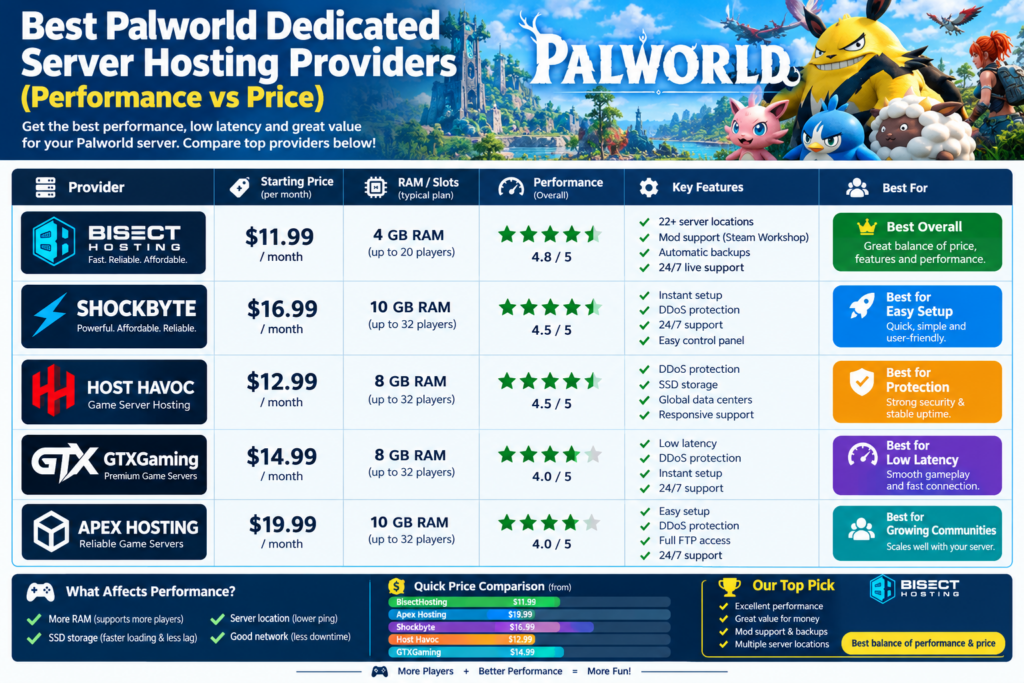
Finding the right host requires balancing single-thread CPU performance, high-frequency DDR5/DDR4 RAM, and price stability. This benchmark-driven guide compares top Palworld dedicated server hosting providers to help you select the ideal host for your squad or public gaming community.
Palworld Hardware Requirements: The Real Resource Bottlenecks
Unlike procedural voxel games like Minecraft, Palworld relies heavily on physics calculations, tick rates, and real-time pathfinding for dozens of active Pals. Pocketpair’s official guidelines specify a minimum of 4 CPU cores and 16 GB of RAM for stable performance.
The CPU Clock-Speed Requirement
Palworld’s dedicated server architecture handles entity AI, collision checks, and item degradation primarily on main threads. High single-thread performance (3.8 GHz+ boost) using newer architectures like AMD Ryzen 5000/7000 or Intel 13th/14th Gen processors outpaces high-core-count, low-clock enterprise Intel Xeon chips.
RAM Footprint and Memory Leak Mitigation
Palworld is notorious for memory leaks that scale with player counts and active base structures. While an 8 GB server can boot for 2 to 3 casual players, active worlds require 16 GB to 32 GB of RAM to prevent abrupt Out-Of-Memory (OOM) crashes during long sessions.
Storage I/O Bottlenecks
Pocketpair warns that slow storage drives risk save-data corruption during auto-saves. Fast Enterprise NVMe SSDs are required to ensure continuous world saving without causing hitching or disconnects.
Top Palworld Dedicated Server Hosts Compared
1. BisectHosting — Best Overall Performance & Control Panel
BisectHosting delivers an impressive balance of high-tier hardware and ease of use, featuring an intuitive customized panel built on Pterodactyl.
- Hardware Specs: Ryzen 7000-series processors, high-speed DDR5 RAM, Enterprise NVMe drives.
- Pricing Tier: Starting around $11.99–$14.99/month for baseline Palworld setups.
- Standout Features: Full crossplay setup support, instant 1-click mod integration, custom server instance switching, and true 24/7 live chat support.
- Pros: Excellent global server coverage, intuitive control panel, transparent instance resources.
- Cons: Advanced backup retention extensions (like BisectBoost) cost extra.
2. Godlike.host — Best High-Performance Hardware for Communities
Godlike.host prioritizes hardware performance, deploying server instances across high-frequency Ryzen hardware with robust network routes.
- Hardware Specs: High-clock Ryzen CPUs (up to 5.7 GHz boost), DDR5 RAM, Gen4 NVMe storage.
- Pricing Tier: Plans start at roughly $12.79/month.
- Standout Features: Custom game panel, sub-user admin permission controls, built-in Discord webhook notifications, and automated, customizable backup schedules.
- Pros: Exceptional single-thread CPU performance, low tick drops during multi-base crafting, high DDoS protection limits.
- Cons: First-time promotional discounts scale up upon renewal.
3. Nitrado — Best Ecosystem & Crossplay Infrastructure
Nitrado remains an enterprise-grade staple in game server hosting, featuring official partnerships and automated maintenance tools.
- Hardware Specs: Custom server clusters running high-clock Intel/AMD chips, enterprise-grade SSD arrays.
- Pricing Tier: Tiered based on player slots and RAM allocations starting around $12.00–$16.00/month.
- Standout Features: Web-based quick-configuration tools for
PalWorldSettings.iniediting, automatic game updates, and effortless slot-scaling options. - Pros: High server uptime stability, intuitive multi-game management, automated scheduled restarts to combat memory leaks.
- Cons: Web panel interface can feel complex for first-time server hosts.
4. Shockbyte — Best Value for Budget-Conscious Players
Shockbyte provides affordable, no-frills hosting options, making dedicated servers accessible for small friend groups.
- Hardware Specs: Standard NVMe drives, modern high-frequency quad-core CPUs, flexible DDR4/DDR5 pools.
- Pricing Tier: Budget-tier entry starting at roughly $10.24–$12.00/month.
- Standout Features: Full SFTP file access, automatic world saving, basic DDoS protection, and instant setup guarantees.
- Pros: Highly competitive pricing per slot, straightforward setup wizard.
- Cons: Custom control panel offers fewer deep configuration toggles compared to premium competitors.

Quick Recommendation & Feature Summary
| Hosting Provider | Target Audience | RAM Allocation | Key Strength | Monthly Starting Price (Est.) |
| BisectHosting | Mixed/Modded Groups | 8 GB – 32 GB | Intuitive Control Panel & Instant Support | ~$11.99 |
| Godlike.host | Large Public Communities | 12 GB – 32 GB+ | Top-tier Single-Thread Ryzen CPUs | ~$12.79 |
| Nitrado | Crossplay & Casual Guilds | Tiered by Slot/RAM | Automated Restarts & Web Admin Tools | ~$12.00 |
| Shockbyte | Budget Friend Groups | 6 GB – 16 GB | Low Starting Cost & Uncapped Player Slots | ~$10.24 |
Frequently Asked Questions
How much RAM does a Palworld dedicated server actually need?
A small group of 2–4 players can run on 8 GB of RAM, provided the server is restarted regularly to clear memory build-up. For 8 to 16 players across multiple automated bases, 16 GB of RAM is recommended. Large public communities with 32 players require 32 GB of RAM to prevent out-of-memory crashes.
How do I stop my Palworld server from lagging during automated base tasks?
Server lag is typically caused by high CPU single-thread usage or RAM limits. Schedule automated server restarts every 6–12 hours using your host’s control panel to clear memory leaks. Additionally, verify that your host uses fast NVMe drives to prevent hitching during world saves.
Can Xbox, PlayStation, and PC Steam players join the same dedicated server?
Crossplay works seamlessly on dedicated servers as long as your host keeps game updates up-to-date and crossplay parameters enabled in the PalWorldSettings.ini configuration file.
Sources & References
- Pocketpair Developer Documentation: Official Palworld Dedicated Server Requirements & Configuration Specs.
- Steam Developer Wiki: SteamCMD Dedicated Server Distribution Guidelines.
- Pterodactyl Network Benchmark Data: Game Server Control Panel Resource Management Standards.
- Cloudflare Threat Research: DDoS Protection Guidelines for Public UDP Game Server Hosting.